Google Drive file requests

Let anyone upload files to your Google Drive, no Google account needed

Google Drive has no open, upload-only link for people outside your account. A BeamUp upload link adds one. Share it with a client, vendor, or applicant, and their files land in the Drive folder you chose. They never sign in and never see the folder.

5 free uploads. No card needed. Senders need a desktop browser to upload.

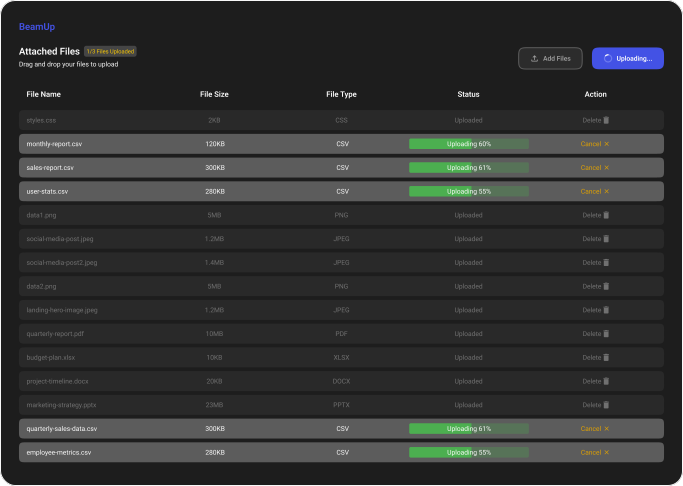
BeamUp upload page listing CSV, PDF, and document files as they upload
What your sender sees: the BeamUp upload page

Can people upload to your Google Drive without signing in?

Google’s own tools don’t offer an open, upload-only link. Google Forms makes every uploader sign in to a Google account.* A shared folder usually needs a Google account. Workspace visitor sharing works without one, but only if your admin enables it, the visitor verifies an emailed PIN, and the visitor gets access to the folder.† A BeamUp upload link lets senders upload without signing in or seeing the folder.

Checked against Google’s help pages in September 2026.

Every way to collect files in Google Drive from people outside your account

BeamUp upload link

A link that opens a plain upload page and writes into the Drive folder you chose.

Best for
Collecting files from clients, vendors, partners, or applicants, once or on a schedule.
Limitation
It adds a third-party service. Anyone with the link can upload, and BeamUp doesn’t identify individual senders. Uploading works on desktop browsers only.

Google Forms file upload

Add a file-upload question to a form. Files land in a folder the form creates in your Drive.

Best for
Collecting files alongside form answers from people who already use Google.
Limitation
Every respondent must sign in to a Google account to upload.*

Shared folder

Share a folder and give the sender edit access.

Best for
A trusted collaborator who already works in Google Drive.
Limitation
The sender usually needs a Google account, and edit access lets them see, open, and delete everything in the folder.

Workspace visitor sharing

People without a Google account reach a shared folder by verifying an emailed PIN.

Best for
Occasional collaboration with a known outside party, when your admin allows it.
Limitation
Workspace only, and admin-controlled. The visitor gets access to the folder, not a one-way upload page.†

Email attachments

The sender attaches files to an email and you save them to Drive yourself.

Best for
A single small file.
Limitation
Attachment size limits, files scattered across threads, and manual saving to Drive.

How a Google Drive file request works in BeamUp

Two steps on your side, once. The person sending files only sees an upload page.

1Your side

Connect Google Drive

Sign in with Google and approve BeamUp. It asks only for access to the files it adds, not the rest of your Drive.

2Your side

Create an upload link

Name the link and paste the link of any Drive folder you already use. Copy the upload link.

3Sender’s side

The sender uploads

They open your link on a desktop browser and upload. No account, no sign-in, no access to your folder.

One link for files that arrive every week

Give a partner one upload link for their Friday CSV export. They use the same page each week, and every file lands in the Drive folder your team expects.

What BeamUp can reach in your Drive

  • A narrow connectionBeamUp asks Google only for access to the files it adds, not the rest of your Drive. You can revoke the connection at any time from your Google account.
  • Senders see an upload page onlyThey can’t browse the destination folder or anything else in your Drive.
  • BeamUp keeps the link workingBeamUp stores your link settings, your Drive connection, and an upload count for billing in a database encrypted at rest with AES-256.

Where file contents travel

  1. 1Sender’s browser
  2. 2Google upload session
  3. 3Your Drive folder

File contents go straight to Google Drive, not through BeamUp’s servers.

Google Drive file request questions

Does Google Drive have a file request feature?

As of September 2026, Google Drive does not offer a Dropbox-style file request. Google Forms can collect files, but respondents must sign in to a Google account.* Workspace visitor sharing lets people without a Google account into a shared folder after they verify an emailed PIN, if your admin allows it.†

Can I use a folder I already have in Google Drive?

Yes. When you create the upload link, paste the link or ID of any folder in your Drive. Files land in that folder.

Who can upload through my link?

Anyone who has the link. BeamUp does not ask senders to identify themselves. Create a separate link for each client or vendor when you want their files kept apart.

Can I reuse the same link?

Yes. A link stays open until you delete it, and every upload goes to the same folder.

Can people upload from a phone?

Not yet. The upload page works on desktop browsers. Ask senders to open the link on a laptop or desktop computer.

What happens to my files if I stop using BeamUp?

They stay in your Google Drive. BeamUp never held a copy, so there is nothing to export.
Stop chasing files over email

Connect Google Drive, paste a folder link, and share your first upload link.

Create a Drive upload link

Try it with 5 free uploads. No card needed. See plans